Your AI coding tools finally remember.
One static Rust binary. Persistent memory that survives every session close, and a symbol-level graph of your code that says when it has fallen behind.
- v0.18.0
- MIT
- Rust
- SQLite / Postgres
Every AI coding session starts from zero.
Context vanishes
Close a session and everything is gone. The next session has no idea what you just built, what you decided, or what went wrong. You explain the same context again and again.
The codebase is a black box
Starting work on an unfamiliar project means hours of reading files before you can ask a meaningful question. Your assistant can grep for a name, but it cannot tell you which function is the hub, what calls it, or how much of it you are about to break.
Knowledge walks out the door
When a developer leaves or switches teams, their understanding of the system leaves with them. There is no persistent, searchable record of why things were built the way they were.
The AI has access to your code.
It just has no memory of your project.
Persistent memory for the AI age.
Huginn & Muninn works silently alongside your AI tools — remembering, learning, and surfacing exactly what your AI needs to be genuinely useful from session one.
Muninn
The Memory
Stores decisions, bug fixes, patterns, and business rules with full context. Searches by meaning — not keywords. Survives every session close, context reset, and compaction event.
One setup command wires 6 editors, and any MCP-aware client works.
Huginn
The Scout
Flies across your codebase and extracts architectural knowledge. No code execution, no install required — works on any project in any state. Parses 5 languages: Rust, TypeScript, JavaScript, Python, Go.
Builds a symbol-level call graph with per-function complexity, not just a file list.
Curator
The Oracle
Answers questions about your project with citations and confidence scores. Onboards a new developer or AI session in seconds. Always cites its sources. Never guesses.
If it doesn’t know, it tells you — and tells you what to do next.
An edge is evidence, or it is absent.
runar crawl extracts every
definition, every call site and per-function cyclomatic complexity into a dedicated
codegraph.db, then resolves those
calls into edges through 6 confidence tiers — from an import map at
0.95 down to a bare name-suffix guess at 0.55.
Calls it cannot resolve are counted per file and reported. They are never attached to a plausible-looking definition, because a wrong edge is worse than a missing one: it is a confident answer to a question the tool cannot actually answer.
On a 3,752-file project the graph adds 1.7 seconds to the crawl.
runar graph search <query>
runar graph symbol <name>
runar graph trace <name> --direction callers
runar graph status
Or from inside your assistant, as MCP tools:
- huginn_search_graph
- huginn_symbol
- huginn_trace
Every other surface targets an agent. This one targets you.
runar graph serve opens a browser on
127.0.0.1.
runar graph export writes the same
interface to one HTML file that works offline.
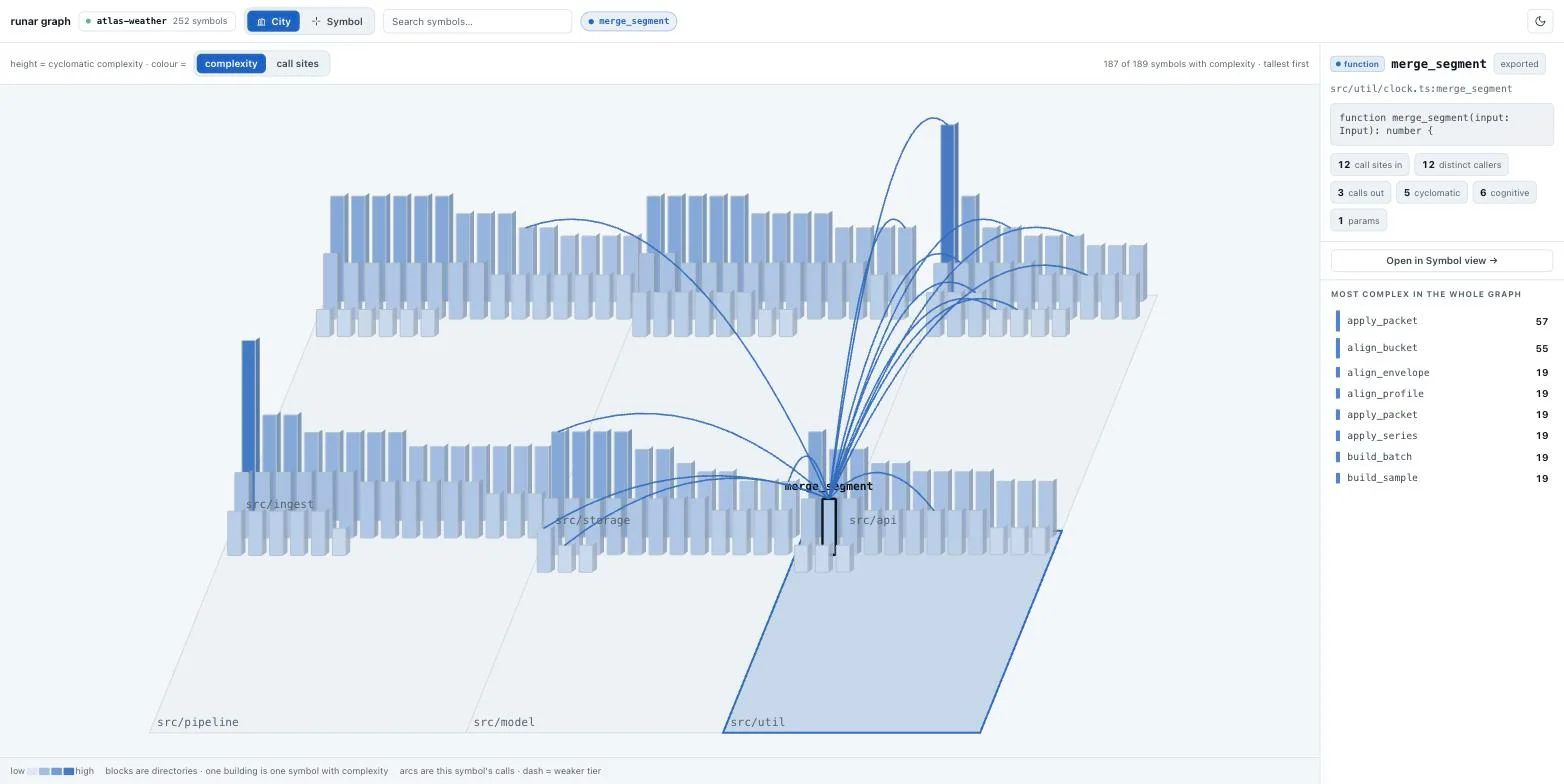
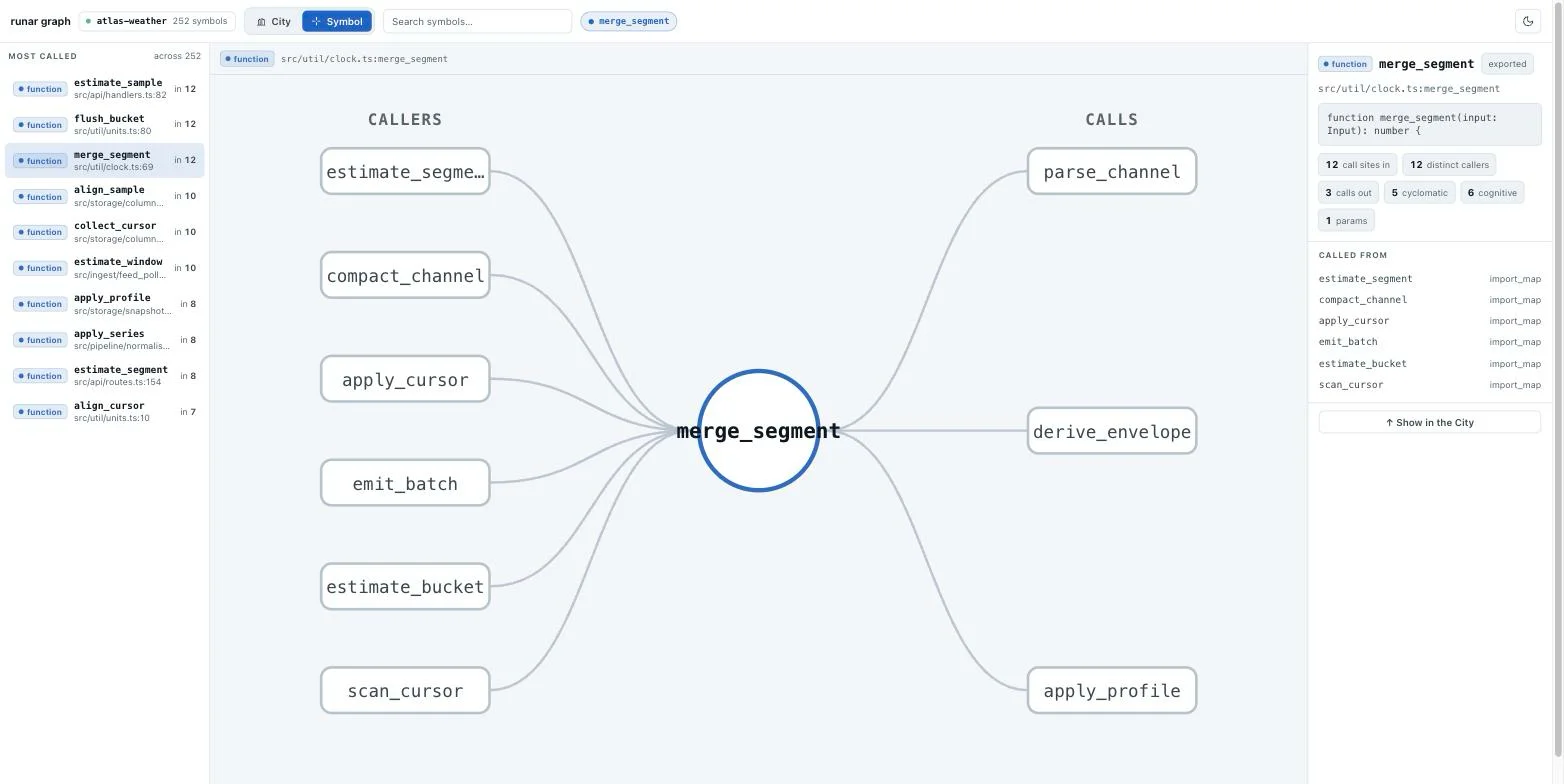
blocks are directories one building is one symbol dash = weaker resolver tier
runar graph serve binds 127.0.0.1
only, puts a 128-bit random token in the URL path, validates the
Host header against DNS rebinding, answers
GET only, and opens the store read-only. No bundler, no CDN, no
vendored JavaScript, and no new dependency.
A tool that refuses to guess.
The expensive failure in this category is not a missing answer. It is a confident wrong one.
It says when it is behind
Every index records the commit at HEAD and a signature over the working tree, so a stale graph reports itself instead of answering confidently from an old picture. When it cannot know — no git, or a graph built before the feature existed — it says "cannot judge" rather than giving a false all-clear.
runar graph refresh --check exit 0 current · 2 stale · 3 cannot tell
It fixes itself, on request
A refresh re-indexes the graph alone in well under a second — only changed files are re-parsed. The opt-in hooks read one timestamp file and spawn a detached child, so the tool call that triggered it never waits, and the next run is held off for twenty times what the last one cost.
runar setup claude-code --with-graph-autorefresh ~0.3s on a 160-file project
Local unless you hand it a key
No telemetry, no analytics, no crash reporting — the only outbound calls in the codebase are ones you turn on. With no OPENAI_API_KEY and no ANTHROPIC_API_KEY, retrieval is keyword-only and summaries come from a local heuristic that never opens a socket. Your data stays in SQLite on disk, or Postgres you run.
The npm package has no install scripts and makes no network calls at install time.
Install it.
Three ways in. The binary is ~16 MB and depends on nothing — no Node, no Python, no runtime.
npm install -g @runar-forge/cli
A tiny launcher; npm pulls the binary as the matching per-platform optional dependency.
No install scripts and no install-time network — so it
installs cleanly even under ignore-scripts=true.
- Linux x86_64
- Linux aarch64
- macOS arm64
- macOS x86_64
- Windows x86_64
Each archive is paired with a .sha256.
git clone https://github.com/crlome/runar-forge.git
cd runar-forge
cargo build --release -p runar-muninn
sudo mv target/release/runar /usr/local/bin/runar
Add --features local-embeddings to bundle on-device
embeddings — about 70 MB instead of 16 MB.
Then point it at your tool
runar init
runar doctor
runar setup claude-code -p my-proj
runar crawl . -p my-proj- claude-code
- vscode
- opencode
- codex
- cursor
- windsurf
The first 4 write their own config. cursor and windsurf print it for you to paste. Hooks — context injection, auto-capture, graph auto-refresh — are Claude Code only; everywhere else it is the MCP tools.
View on GitHub